Stop digging through texts for job numbers and wondering if your check is right. An independent record of every dispatch, every shift, and every dollar — always on you.
Sound Familiar?
The job is hard enough already.
Every trades worker deals with the same things after every shift. DispatchLog eliminates all of them.
⌛
After Every Shift
You just put in 10 hours. Now you have to write down the job number, foreman, address, hours worked, equipment, and mileage — by hand, in a notebook you hope you don't lose. Every shift.
🔍
A Month Later
You need job #26-0112. When was that? What was the address? How many miles? That dispatch email is buried in your inbox somewhere. You're digging through hundreds of them.
📄
Tax Season
The mileage log you meant to keep. You didn't. Now you're trying to rebuild a year's worth of job sites from memory. Every year, same story, money left on the table.
📑
When the Statement Comes
Your union posts a statement of hours your employer reported. The total doesn't match what you actually worked — and you have nothing in writing to back yourself up.
Trust, but verify. Payroll software is built for the office. DispatchLog is built for the field.
What It Does
Faster with every shift.
The app learns as you work. The more you use it, the faster it gets — and the more it has your back when it matters.
🗃
Personal Job Database
The app remembers every job you've worked. Tap Repeat and the job number, address, and foreman pre-fill automatically. Find any job from years ago in seconds — address, foreman name, everything you logged.
$
Catch Paycheck Errors
Companies miss hours. Union credits get miscounted. DispatchLog keeps a timestamped record with exact pay math — ST, OT, and DT by your contract — so you have something in writing when the statement doesn't add up.
📍
Mileage Tracking
Enter a job address and DispatchLog calculates miles from home to job and back via Google Maps — both legs tracked separately, since the return is sometimes different. Every job site, every mile, ready for tax time.
📈
YTD Earnings Dashboard
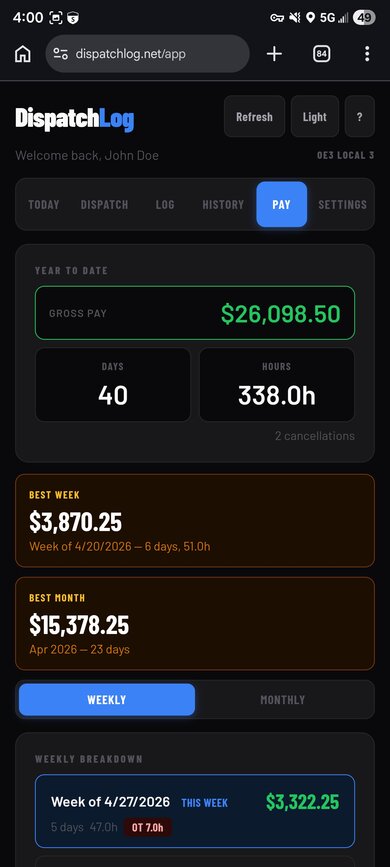
See your week, month, and year-to-date totals at a glance. Straight time, overtime, and mileage in one view. Best week, best month — all tracked.
📄
CSV Export
Download your complete dispatch history as a spreadsheet any time. Your data is always yours — no lock-in, no strings attached.
🌄
Morning Prep
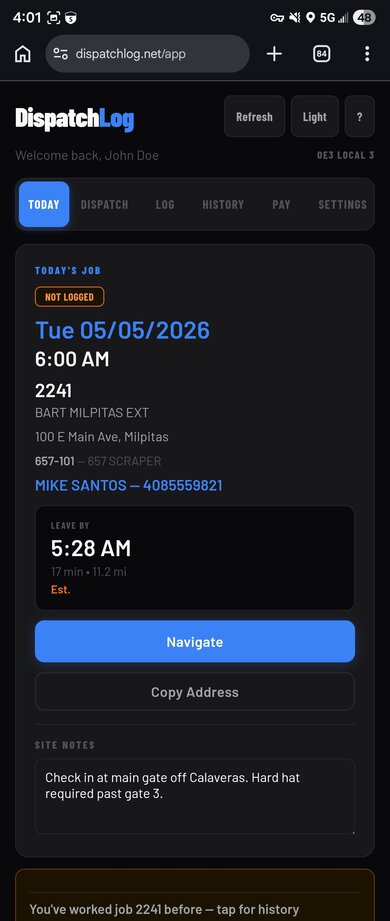
Open the Today tab before you leave. Site weather and a live traffic-adjusted "Leave By" time based on your dispatch address are right there. No guessing, no hunting. Just get out the door on time.
How It Works
Two things. That's it.
Log the dispatch. Log your hours. Pay, mileage, and history update automatically.
1
Log the Dispatch
Tap the Dispatch tab and enter the job number, foreman, address, and report time. Takes about a minute. Once it's saved, mileage calculates automatically. Next time you work that job, tap Repeat and everything pre-fills.
2
Log Your Hours
At the end of the day, open the app and enter your hours. Pay calculates instantly — straight time, overtime, Saturday, Sunday, holiday. Your running totals and full job history update automatically.
Real App Screenshots
What it looks like.
These are actual screenshots — no mockups, no staging data.
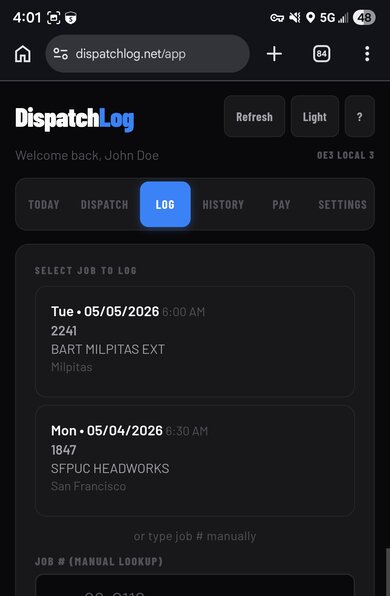
Log Tab
Pay calculated the second you save
Straight time, OT, Saturday, Sunday — right rate, every shift.
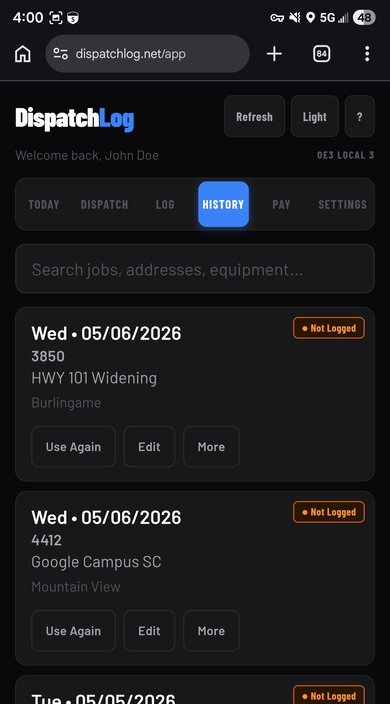
History Tab
Every dispatch, every shift
Hours, equipment, and mileage — searchable, always available.
This is not enterprise software. It is a tool built by someone doing the same work you are, who got tired of doing the paperwork twice.
TL
Travis S. Lopez
Operating Engineers Local 3 · Bay Area
"I built this because I got tired of digging through old texts for job numbers and realizing my paycheck was short 30 minutes here or an hour there. I wanted a way to log my dispatch in 20 seconds, have the math done for me, and keep a record the office couldn't argue with. It's for the field, not the office."
Operating Engineer
FAQ
Common questions.
Any trade — Operating Engineers, Laborers, Carpenters, Ironworkers, Cement Masons. Union pay rules are pre-configured for all five. Manual entry works immediately for any trade not listed.
Yes — just tap the Dispatch tab and fill in the job details. Manual entry works for any trade, any dispatch service, immediately.
Yes. We don't sell your data to contractors, the hall, or anyone else. Your dispatch history, pay records, and job details are stored securely and are yours alone. Download everything as a CSV any time.
No install required. DispatchLog is a web app — open it in Chrome or Safari, add it to your home screen, and it works like a native app on any phone.
Yes. You enter your rate and the effective date during setup. When your rate changes, add a new entry with the new date and DispatchLog uses the correct rate for each shift automatically — past and future.
After 14 days you will need an active subscription to keep using DispatchLog. Your data is never deleted. Subscribe at $9.99/month or contact us at [email protected] with any questions.
Email us at [email protected] and we'll handle it same day — no phone calls, no forms, no hassle. Billing is through Stripe so your card is never stored with us.
Yes — when logging a dispatch, mark it as Do Not Report if the job was cancelled or you were turned away. It stays in your history so your record is accurate.
Start Today
Your career. Archived.
Sign in with Google and log your first job in under a minute. Your record starts the moment you do.